 Litify Ready
Webex Calling × Salesforce Integration
Your Webex Calls, Automatically Logged in Salesforce
The first post-call automation engine built for law firms on Litify — every call captured, summarized, and written back to your CRM without lifting a finger.
AI Summaries
Auto CRM Updates
Duplicate Prevention
Litify Ready
Salesforce
Webex
Live
✓Contact recordUpdated
✓Call log + transcriptAttached
✓Case note createdLitify
✓Duplicate checkClear
Trusted by teams using
Salesforce
Litify
Webex
Cisco
100%Calls captured & logged
0Manual data entry required
CiscoCertified UCaaS Partner
The Real Problem
The Problem Isn’t the Call.
It’s Everything After It.
It’s Everything After It.
Most Salesforce + phone integrations stop at call logging. Your team still does the rest manually.
- ✗ Write call notes manually after every conversation
- ✗ Create or update Salesforce contacts by hand
- ✗ Check for duplicates before creating new records
- ✗ Copy caller info into Litify matter records
- ✗ Follow up on calls that were never documented
- ✗ Lose critical case context when staff turns over
32%Of a rep’s time is lost to manual data entry— Salesforce, State of Sales Report
94%Of organizations suspect their CRM data is inaccurate— Experian Data Quality Report
<50%Of attorney time is actually spent on billable work— Clio, Legal Trends Report
How It Works
Three Steps.
Zero Manual Work.
Zero Manual Work.
From the moment your team picks up a call to a fully updated Salesforce record — completely automatic.
01
Call Happens in Webex
Your team answers or makes calls using the embedded Webex Calling widget — directly inside Salesforce. No app switching, no friction.
→
02
AI Processes the Conversation
The platform transcribes the call, generates an AI summary, analyzes sentiment, and structures the data — instantly after the call ends. (AI Summary & Sentiment: Add-on)
→
03
Salesforce Updates Automatically
Contact records, call logs, case notes, and Litify matter fields are updated with zero manual input. Duplicates prevented. Data clean.
Platform Capabilities
Everything Your Team Needs.
Nothing They Don’t.
Nothing They Don’t.
AI Call Intelligence
Every conversation becomes structured, searchable data attached directly to your Salesforce records.
- Full call transcription
- AI-generated call summary (Add-on)
- Sentiment analysis (Add-on)
- Automatic CRM enrichment
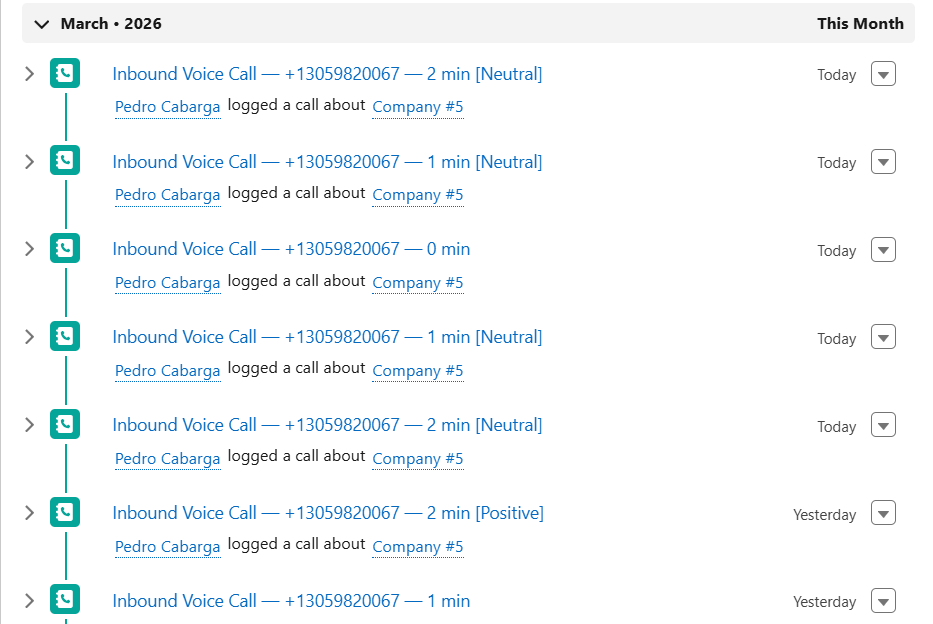
Intelligent Duplicate Prevention
Stop CRM bloat before it starts. Our system identifies existing records before creating new ones.
- Recognize existing contacts on inbound calls
- Assign calls to existing records
- Choose the right phone field dynamically
- Keep Salesforce clean and reliable
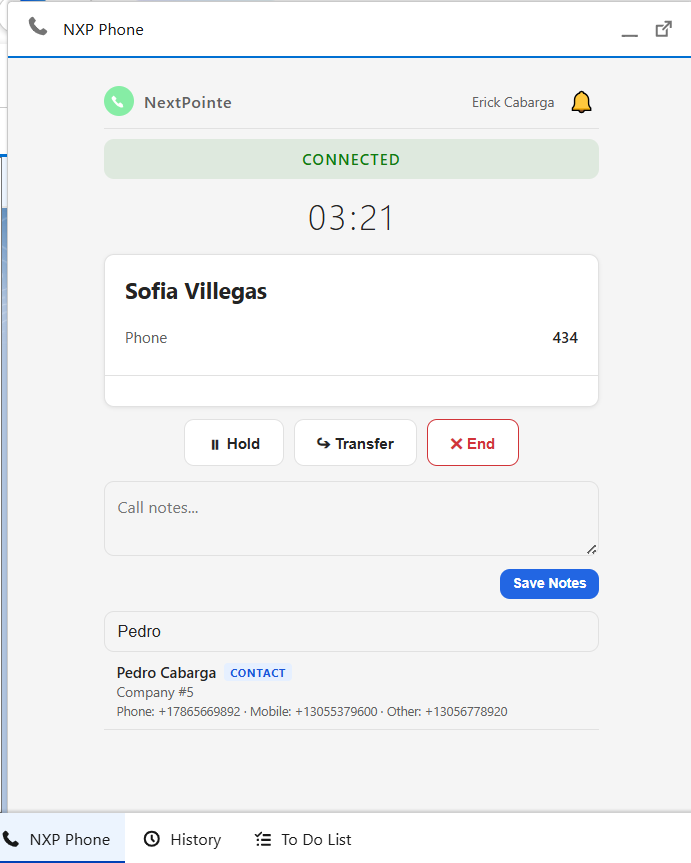
Smart Phone Field Control
Unlike standard CTI tools, agents control exactly where phone numbers are written in Salesforce.
- Choose destination field per call
- Replace or append to existing data
- Maintain data accuracy across records
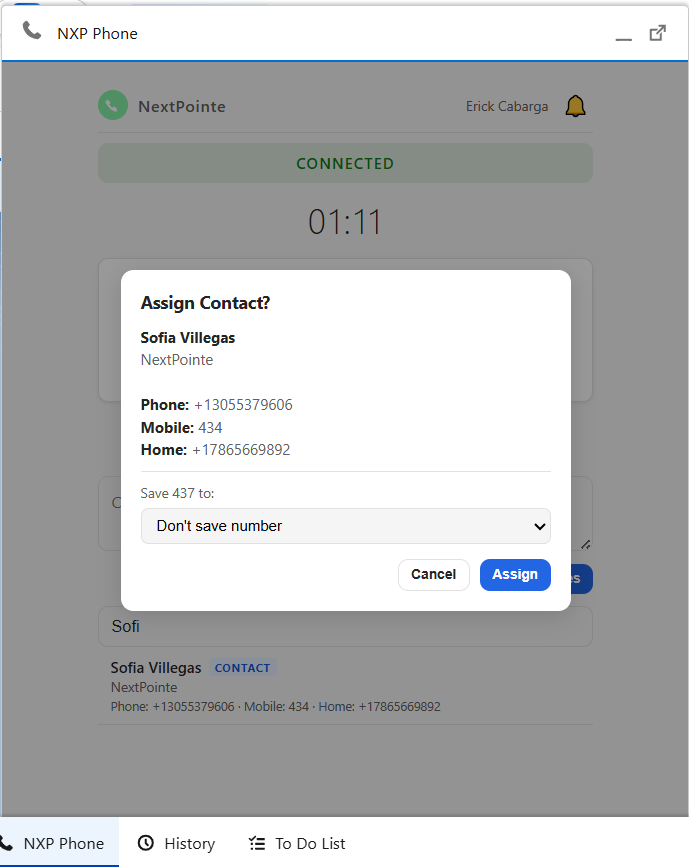
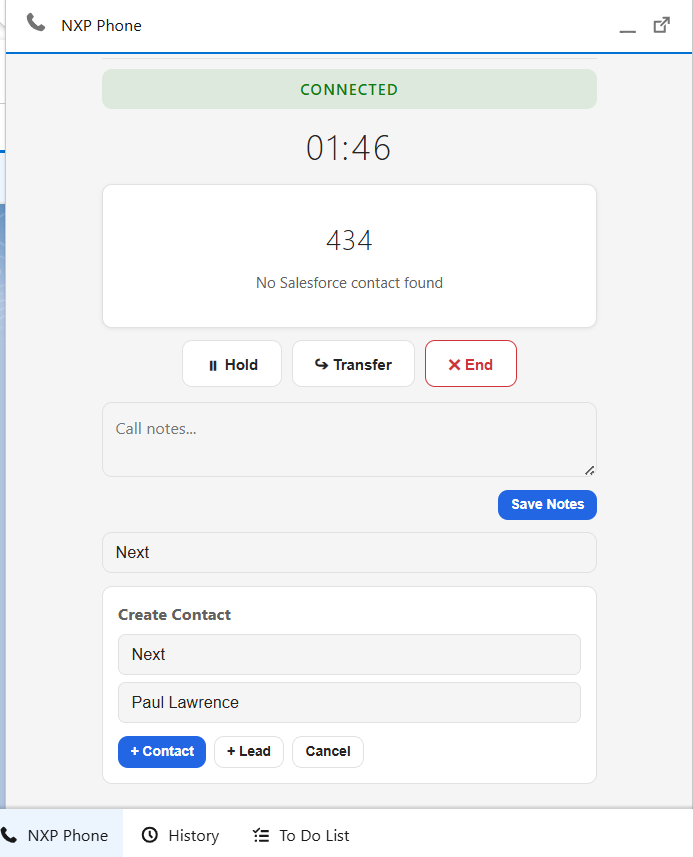
Record Creation Mid-Call
Agents create leads, contacts, or matter records without leaving the call interface — zero workflow disruption.
- Create contact or lead instantly
- Attach to the current call automatically
- Works inside the Webex widget in Salesforce
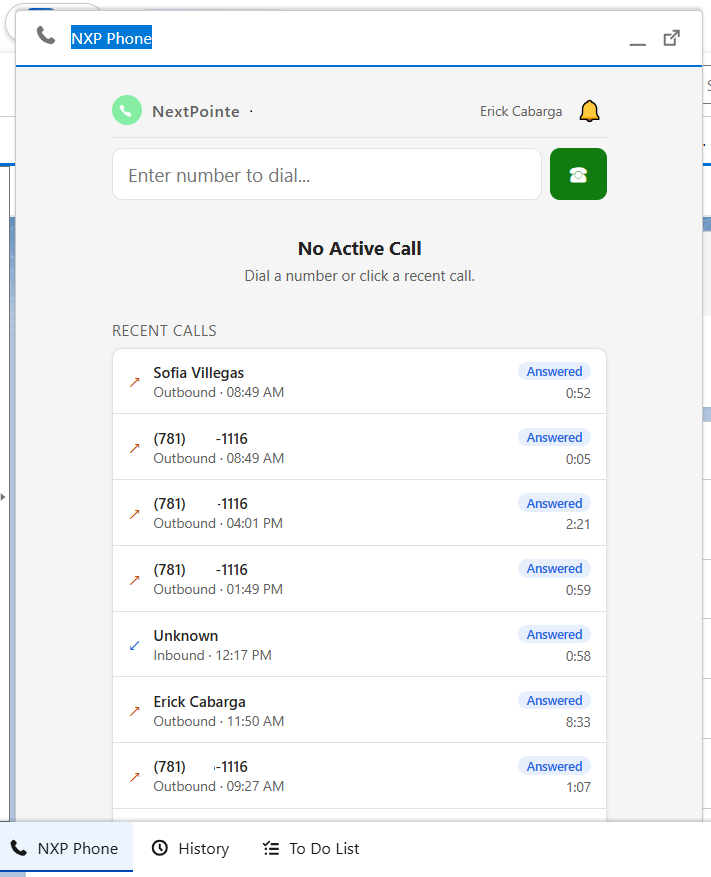
Fully Embedded Webex Calling
Your entire phone system lives inside Salesforce. Agents never need to leave the CRM to handle communications.
- Answer, hold, and transfer calls
- Take notes while on the call
- Full Webex call controls in Salesforce
- Works on Litify layouts
Call Log Intelligence
Every Call Leaves a
Complete Paper Trail
Complete Paper Trail
Every inbound or outbound call automatically creates a structured Task record in Salesforce — with everything your team needs, attached and searchable.
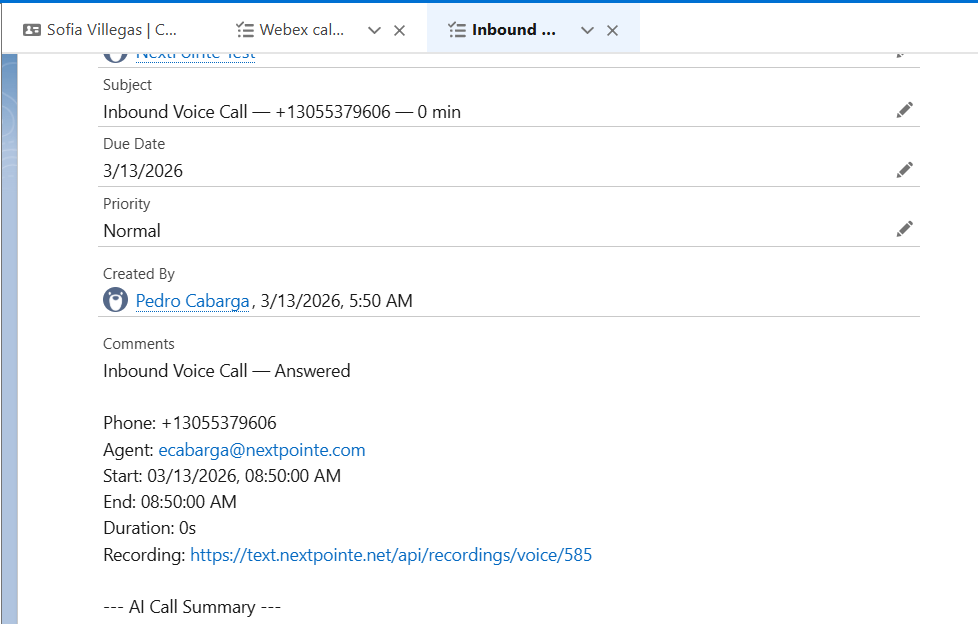
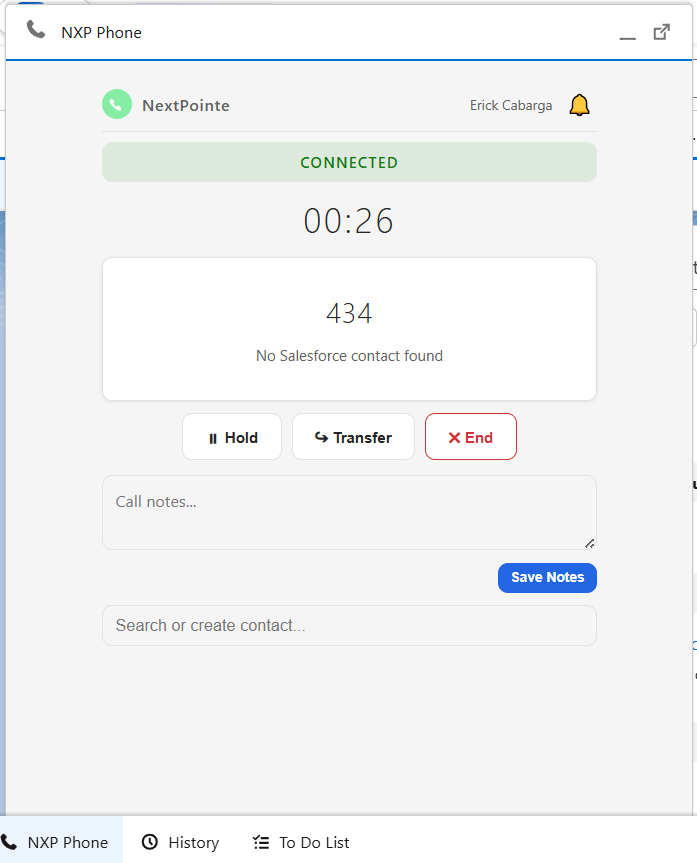
Salesforce Task Record — Live Example
- Contact & AgentCaller identity and the agent who handled the call — linked to the Salesforce record automatically.
- Duration & TimestampExact start time, end time, and call duration captured on every interaction.
- Recording LinkDirect link to the call recording embedded in the task — one click to review any conversation.
- Sentiment Tag (Add-on)AI-detected sentiment (Neutral, Positive, Escalated) surfaced directly in the call subject line.
Post-Call Automation Engine
What Happens After the Call Is Where the Value Is
The moment the call ends, our automation engine takes over. Your team stays focused on clients — not data entry.
- 1Call summary generated — AI writes structured notes automatically (Add-on)
- 2Transcript attached — Full conversation tied to the Salesforce record (Add-on)
- 3Contact record updated — Fields enriched without manual input
- 4Litify matter note created — Case activity logged for compliance
- 5Duplicate check run — CRM database stays clean
- 6Follow-up task triggered — Automated workflows fire based on call outcome
Automation Triggers
After every call, the engine can automatically:
Create case note in LitifyAuto
Generate follow-up taskAuto
Send follow-up emailAuto
Update matter statusAuto
Trigger Salesforce workflowAuto
Log call to analytics dashboardAuto
Legal Use Cases
Built for High-Volume Client Calls
Intake Calls
Capture potential client info, auto-create a Litify intake record, and attach the AI summary — all before the call ends.
Active Matter Updates
Every client call auto-logs a case note to the correct Litify matter. Full conversation history without manual entry.
Compliance & Documentation
Transcripts and summaries attached to records ensure complete documentation for compliance, handoffs, and case reviews.
Ready to See It Live
Turn Your Calls Into
Structured Intelligence
Structured Intelligence
Stop logging calls manually. Let the Post-Call Automation Engine do the work — so your team focuses on clients, not data entry.
Book a DemoCisco-certified UCaaS partner · Salesforce + Litify native · No IT project required