Is It Actually Legal to Record Your Business Calls? The ultimate Guide (2026)
August 3, 2026
WhatsApp Business API Pricing Is Changing October 1, 2026:
August 26, 2026
Understanding your VoIP bandwidth requirements is one of the first steps when preparing your business for cloud calling.
If your business is considering VoIP or cloud calling, one of the first questions you may have is:
Is our internet connection fast enough for VoIP?
For most modern business internet connections, the answer is likely yes. Voice calls themselves don’t require enormous amounts of bandwidth.
But there is an important catch:
Having enough bandwidth doesn’t necessarily mean your network is ready for VoIP.
Call quality also depends on latency, jitter, packet loss, network congestion, Quality of Service (QoS), Wi-Fi performance, and the overall reliability of your connection.
In this guide, we’ll explain how much bandwidth VoIP actually needs, how to estimate your business requirements, and how to determine whether your network is ready for cloud calling.
Quick Answer: How Much Bandwidth Does VoIP Need?
For general planning, approximately 100 Kbps per concurrent call leg is a useful conservative starting point.
Cisco’s Webex Calling documentation provides bandwidth estimates of approximately 70–80 Kbps for common audio call scenarios, depending on the codec and call type. Cisco’s CScan network-readiness tool uses an assumption of 100 Kbps for each audio call leg when estimating concurrent call capacity.
This makes 100 Kbps a convenient conservative figure for preliminary planning rather than an exact measurement of what every VoIP call will consume.
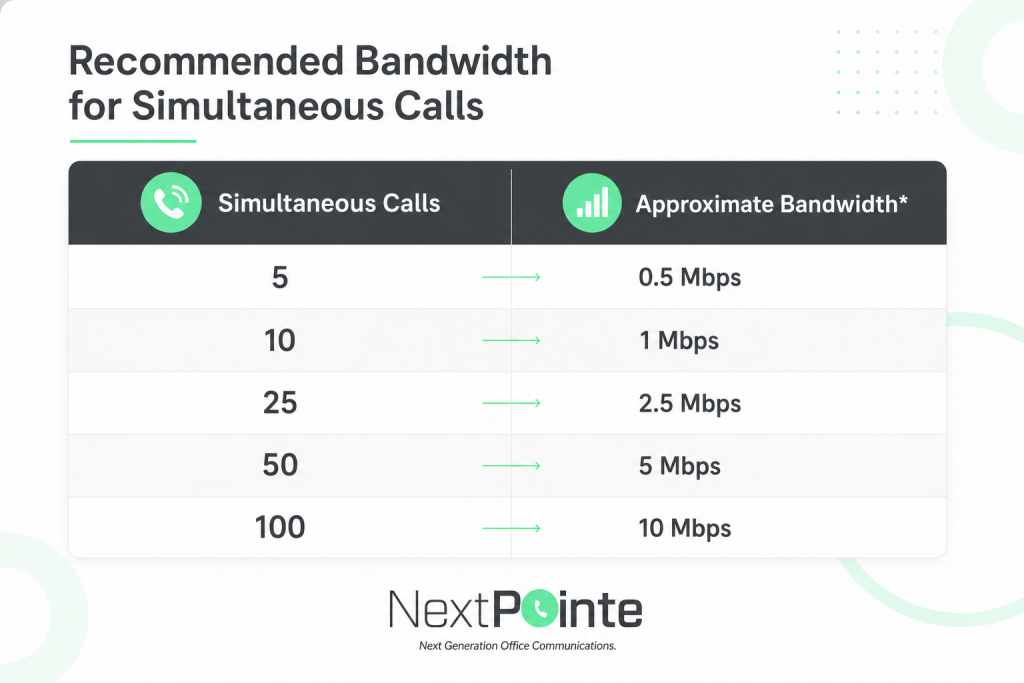
*Simplified planning estimate based on approximately 100 Kbps per concurrent call. Actual bandwidth consumption depends on the codec, call scenario, network overhead, and platform configuration.
And remember: we’re talking about simultaneous calls, not the total number of employees or phone extensions.
A company with 100 employees rarely has all 100 employees on external calls at exactly the same time.
How to Calculate Your Business VoIP Bandwidth Requirements
A simple starting calculation is:
Peak simultaneous calls × estimated bandwidth per call = estimated voice bandwidth requirement
Suppose your business has 50 employees but typically has no more than 15 simultaneous calls.
Using 100 Kbps as a conservative planning estimate:
15 × 100 Kbps = approximately 1.5 Mbps
That may sound surprisingly small — and it is.
Voice is relatively bandwidth-efficient compared with many modern business applications.
However, your VoIP system doesn’t operate on an empty network.
At the same time your employees are making calls, your internet connection may also be supporting:
- Microsoft 365 or Google Workspace
- Cloud CRM applications
- Web browsing
- File transfers
- Cloud storage and backups
- Video conferencing
- Security systems
- Remote employees
- SaaS applications
- Other business-critical services
That’s why determining your overall bandwidth requirements is just as important as calculating the bandwidth required by the phones themselves.
You should also maintain adequate capacity for normal traffic peaks and future growth rather than designing a network that operates continuously at its theoretical limit.
What Determines How Much Bandwidth a VoIP Call Uses?
VoIP works by converting voice into digital information that can travel across an IP network.
One of the technologies responsible for that process is the codec.
A codec encodes and compresses audio before transmission and decodes it at the destination. Different codecs can use different amounts of bandwidth while providing different characteristics for voice quality and network efficiency.
Cisco’s Webex Calling documentation, for example, provides bandwidth calculations using codecs including Opus, G.711, and G.722.
If you’d like to understand the technology in more detail, NextPointe’s guide to VoIP codecs explains how codecs influence bandwidth and voice quality.
But for most businesses evaluating cloud calling, you don’t need to become a codec expert.
What matters is understanding this:
The number of simultaneous calls determines your voice bandwidth requirement — but network quality determines how well those calls actually sound.
Internet Speed Is Not the Same as VoIP Quality
This distinction is extremely important.
Consider two hypothetical businesses.
Business A
- 1 Gbps internet connection
- Congested Wi-Fi
- High jitter
- Intermittent packet loss
- No voice traffic prioritization
Business B
- 200 Mbps internet connection
- Well-designed network
- Low latency
- Minimal packet loss
- Proper Quality of Service
Despite having significantly less advertised bandwidth, Business B could provide the better calling experience.
That’s because real-time communications depend on more than how many megabits per second appear on an internet speed test.
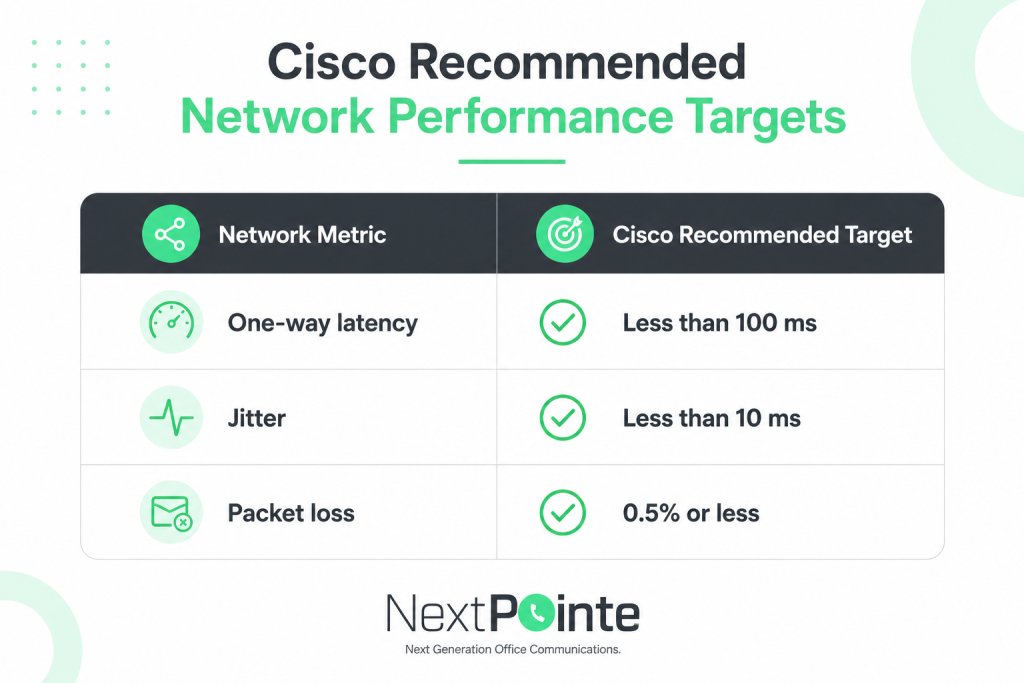
For Webex Calling over the internet, Cisco recommends the following targets for optimal voice quality:
These measurements tell us something raw bandwidth alone cannot:
How reliably and consistently is the network delivering voice traffic?
Let’s look at each one.
1. Latency: How Long Does Voice Take to Arrive?
Latency measures the delay involved in moving data across the network.
A slight delay loading a website might go unnoticed.
A similar delay during a conversation is much easier to notice because communication happens in real time.
As latency increases, conversations can begin to feel unnatural. Participants may unintentionally talk over each other because they’re hearing the other person later than expected.
Cisco recommends less than 100 milliseconds of one-way latency for optimal Webex Calling voice quality over the internet.
2. Jitter: Are Voice Packets Arriving Consistently?
Voice traffic is transmitted as a continuous stream of packets.
Ideally, those packets arrive at predictable intervals.
Jitter describes variation in packet arrival timing.
When jitter becomes excessive, voice can sound choppy, distorted, or inconsistent even when the internet connection has plenty of raw bandwidth.
Cisco recommends keeping jitter below 10 milliseconds for optimal Webex Calling voice quality over the internet.
NextPointe has a more detailed guide explaining jitter and packet loss in VoIP and how these conditions can affect communications.
3. Packet Loss: What Happens When Voice Data Never Arrives?
Sometimes packets transmitted across a network don’t reach their destination.
That’s packet loss.
For applications such as file transfers, lost information may be retransmitted.
Voice communication is different because conversations happen in real time.
When voice packets are lost, users may experience symptoms such as:
- Missing portions of speech
- Choppy audio
- Distorted or robotic sound
- Communication interruptions
- Reduced overall call quality
Cisco recommends 0.5% packet loss or less as a target for optimal Webex Calling voice quality over the internet.
If you want to dive deeper into the relationship between these measurements and perceived voice quality, NextPointe’s guide to MOS Score in VoIP provides additional context.
4. Quality of Service: What Happens When the Network Gets Busy?
Your VoIP phones aren’t the only devices competing for network resources.
Imagine that several employees join video meetings while another user uploads a large file and an automated cloud backup begins.
Your network suddenly has several different applications competing for available capacity.
This is where Quality of Service (QoS) becomes important.
QoS policies can prioritize real-time communications traffic across network infrastructure such as switches, routers, and firewalls.
Cisco specifically recommends implementing QoS policies to prioritize real-time traffic in Webex Calling deployments.
The objective isn’t necessarily to make the internet connection faster.
It’s to help ensure that important real-time communications remain prioritized when the network is under load.
For more detail, see NextPointe’s guide to QoS for Cloud Voice.
Wi-Fi vs. Ethernet for Business VoIP
Wi-Fi can provide excellent VoIP performance when the wireless network is properly designed.
But Wi-Fi introduces variables that don’t exist in the same way with wired Ethernet:
- Signal strength
- Radio interference
- Access point capacity
- Building construction
- Device density
- Roaming behavior
- Distance from the access point
Cisco’s CScan documentation specifically notes that users testing over Wi-Fi should ensure they have a strong wireless signal.
For fixed desk phones, wired Ethernet remains an excellent option whenever practical.
For laptops, mobile devices, softphones, and flexible work environments, properly designed business Wi-Fi can also deliver excellent results.
The key is recognizing that your internet connection and your internal network are two different things.
You can have extremely fast internet service entering the building and still experience poor calls because of problems inside the local network.
What About Video Meetings?
Voice calling is relatively bandwidth-efficient.
Video is different.
Cisco’s current Webex Calling migration guidance notes that supported Webex App and compatible phone video calls can use up to approximately 1.5 Mbps per call for 720p H.264 video, with actual consumption varying because video uses variable bit rates.
That means a business shouldn’t evaluate voice requirements in isolation if employees frequently use:
- Webex meetings
- Video calling
- Screen sharing
- Cloud collaboration
- Large file transfers
- Other bandwidth-intensive applications
Twenty simultaneous voice calls may consume only a few Mbps.
Twenty simultaneous video sessions are an entirely different network planning scenario.
This is why effective bandwidth planning starts with understanding how your employees actually work, not simply counting phones.
How Many VoIP Calls Can My Internet Connection Handle?
Technically, a modern business internet connection may have enough raw bandwidth to support far more voice calls than your organization will ever make.
But that’s not the right way to design a network.
Instead of asking:
“What is the maximum number of VoIP calls our connection can theoretically handle?”
Ask:
“Can our network reliably support our peak number of calls while employees continue using every other business application?”
That’s the number that matters.
Cisco also recommends maintaining headroom for other critical traffic and future growth when calculating bandwidth requirements.
A network designed to operate continuously at maximum capacity leaves very little room for unexpected traffic spikes.
Is Your Network Ready for Business VoIP?
Before migrating your business communications to the cloud, evaluate more than the advertised speed on your internet plan.
A VoIP readiness assessment should consider:
- Download bandwidth
- Upload bandwidth
- Peak concurrent calls
- Latency
- Jitter
- Packet loss
- Network congestion
- Quality of Service
- LAN infrastructure
- Wi-Fi performance
- Firewall configuration
- Internet reliability
- Redundancy requirements
And whenever possible, test your network under realistic operating conditions.
Testing an empty office early in the morning may produce very different results from testing during your busiest business hours.
How to Test Your Network for Cisco Webex Calling
Cisco provides a tool called CScan to evaluate whether a network is ready for Webex Calling.
The CScan Basic Test evaluates:
- Concurrent call estimates
- Download bandwidth
- Upload bandwidth
- Latency
- Traceroute information
- Selected TCP ports
The Advanced Diagnostic Test adds:
- Download and upload packet loss
- Download and upload jitter
NextPointe provides instructions for running the Webex Calling Network Quality Test.
This type of testing is especially valuable before deployment.
Rather than discovering a network problem after users begin reporting poor calls, businesses can identify potential issues before migrating their communications.
What If Your Network Isn’t Ready for VoIP?
A failed network assessment doesn’t necessarily mean your business can’t move to cloud calling.
It means you’ve identified something that should be addressed first.
Depending on the problem, improvements might include:
- Increasing available internet capacity
- Improving Wi-Fi coverage
- Configuring QoS
- Updating network equipment
- Correcting firewall configuration
- Addressing packet loss or excessive latency
- Separating or prioritizing voice traffic
- Adding redundant internet connectivity
- Reviewing the overall network design
Cisco’s Webex Calling deployment guidance also recommends considering redundant internet connections when high availability is required.
The important thing is identifying those requirements before your phone system depends on the network every day.
The Bottom Line: Bandwidth Is Only Part of VoIP Readiness
So, how much bandwidth does VoIP need?
Surprisingly little.
For initial planning, approximately 100 Kbps per concurrent call provides a useful conservative starting point, while actual Webex Calling audio bandwidth can vary depending on the codec and call scenario.
But bandwidth isn’t the whole story.
A successful business VoIP deployment also depends on:
Low latency. Low jitter. Minimal packet loss. Proper QoS. Reliable connectivity. And a network designed for real-time communications.
A 1 Gbps internet connection doesn’t automatically guarantee excellent calls.
And a well-designed 200 Mbps network may perform beautifully.
The goal isn’t simply to have a fast connection.
The goal is to have a network that’s ready for cloud communications.
Planning a Move to Cisco Webex Calling?
Moving your business phone system to the cloud shouldn’t begin with installing phones.
It should begin with understanding your network.
NextPointe helps businesses evaluate their communications requirements and deploy modern cloud calling solutions powered by Cisco Webex Calling.
Whether you’re replacing an aging phone system, supporting remote employees, connecting multiple locations, or modernizing your business communications, evaluating the network before deployment can prevent many common VoIP quality problems.
Not sure whether your network is ready for cloud calling?
Talk to a NextPointe specialist about your current network, phone system, and communication requirements.
Frequently Asked Questions
How much bandwidth does one VoIP call use?
The exact amount varies by codec, call scenario, and network overhead. Cisco’s Webex Calling documentation provides examples around 70–80 Kbps for common audio scenarios, while Cisco’s CScan tool uses a conservative assumption of 100 Kbps per audio call leg when estimating concurrent call capacity.
For preliminary business planning, approximately 100 Kbps per concurrent call is therefore a useful conservative starting point.
Is 100 Mbps enough for business VoIP?
For voice traffic alone, 100 Mbps represents substantially more raw bandwidth than most small and midsize businesses require.
However, VoIP shares the network with other applications, so bandwidth should be evaluated alongside video meetings, cloud applications, file transfers, internet usage, and peak demand.
Does VoIP require good upload speed?
Yes.
VoIP communication is bidirectional. Your network continuously sends and receives voice data during a conversation, making upload capacity an important part of VoIP planning.
Can I have bad VoIP calls with fast internet?
Absolutely.
A fast connection can still produce poor calls because of excessive latency, jitter, packet loss, congestion, Wi-Fi problems, or network configuration issues.
Internet speed and network quality are not the same thing.
How many VoIP calls can 10 Mbps support?
Using 100 Kbps per call as a simplified planning estimate, 10 Mbps represents enough raw bandwidth for roughly 100 simultaneous calls.
That should not be interpreted as a recommended network design.
Your business needs capacity for other applications, normal traffic fluctuations, network overhead, and future growth.
Should I test my network before switching to VoIP?
Yes.
Network testing can identify bandwidth limitations, latency, jitter, packet loss, firewall problems, and other conditions that may affect cloud calling before deployment.
Cisco provides CScan specifically to help assess network readiness for Webex Calling.
Does Cisco Webex Calling require a dedicated internet connection?
Not necessarily.
Webex Calling can operate over an appropriately designed business internet connection shared with other applications. The network should have adequate upstream and downstream capacity, low latency, appropriate QoS, reliable connectivity, and proper firewall configuration.
Not Sure If Your Network Is Ready for VoIP?
You don’t have to figure it out on your own. At NextPointe, we help businesses evaluate their network, connectivity, and communication requirements before moving to cloud calling. Whether you’re considering Cisco Webex Calling, replacing an aging phone system, or simply want to know if your current network can support reliable VoIP, our team can help you determine the right next step. Call NextPointe or contact us today to talk with a communications specialist and make sure your move to the cloud starts with a network that’s ready for it.